OpenAtlas user interface translations
OpenAtlas offers several user interface translations. English and German are provided by the OpenAtlas team, others are kindly provided by supporters via GitHub pull requests.
Because OpenAtlas is continuously developed we actively ask about updates once a year around January but translators can provide updates anytime they like.
This page provides detailed instructions how to update translations. If you are interested in adding translations for a new language please create an issue for it and we will set it up.
See Translations for more technical information about how these are implemented in OpenAtlas.
Current translations
- English
- German
- Catalan - thanks to Enric Rodellas
- Spanish - thanks to Enric Rodellas
- French - thanks to Clément Besnier
- Polish - thanks to Zuzanna Guzek
Prerequisites
- Installation of Poedit to edit the translation files. We are using the free version 3.6.3 but other versions should be fine too.
- A GitHub user account for submitting changes via GitHub pull requests
- Installation and basic understanding of the Git versioning system
- Time: currently there are over 600 user interface translations so starting a new language will take some time. Later updates will be much faster.
Workflow
To avoid possible merge conflicts a GitHub pull request should be created based on the develop branch at GitHub, only containing updated .po files (not the .mo or other files).
Shown examples are using the French translations, for your translation you'll have to change e.g. the fr part in paths accordingly.
Get OpenAtlas
- Fork the OpenAtlas repository on GitHub and make sure that the Copy the main branch only checkbox is not checked
- Clone it locally on your machine
- Switch to the develop branch and create a new branch based on it
git checkout develop
git checkout -b french_translations
Preparations
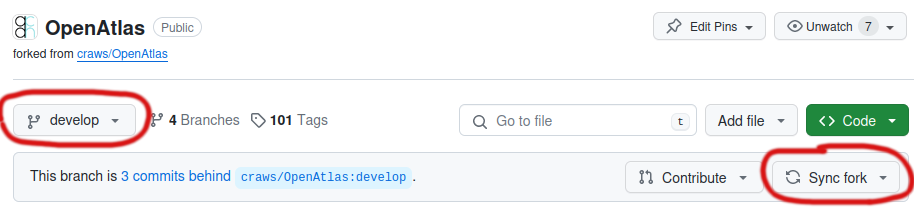
- Update the online develop branch in your GitHub fork. You can do this with the Sync fork button after switching to develop (see screenshot below).
- Switch to the develop branch on your local machine and make sure it is up to date
git checkout develop
git pull origin develop
- Switch to your french_translations branch and make sure it is synced with the develop branch
git checkout french_translations
git merge develop
Update the translations
- Open the .po translation file you want to update with Poedit (we are using the free version 3.6.3)
e.g. the French .po file would be located at: openatlas/translations/fr/LC_MESSAGES/messages.po - After saving your changes in Poedit a git status command shows the changed .po and .mo files
git status
Changes not staged for commit:
    modified:   openatlas/translations/fr/LC_MESSAGES/messages.mo
    modified:   openatlas/translations/fr/LC_MESSAGES/messages.po
Commit and create a pull request
- Because we only want the changed .po files you can "reset" the .mo file
git restore openatlas/translations/fr/LC_MESSAGES/messages.mo
- Check again if git status only shows .po files, commit and push your changes
git status
git commit -a -m "Updated French translations"
git push origin french_translations
- Make a pull request from your french_translations branch to the OpenAtlas develop branch on GitHub
Additional information
- Most source texts in the translations files are already 1:1 strings in English but sometimes, e.g. for a longer text it may differ, like for "warning no js".
- In doubt you can always compare it to existing translations, e.g. for English in the translation folder or at GitHub
Location of strings to be translated
Most of the strings to be translated are in the Python and HTML source code marked with an underline function, like e.g.
_('actor')
The Python/JavaScript "switch" for translation needed for JavaScript components is located at openatlas/templates/util/translations.html.
Exception being JavaScript translations for 3rd party code located in openatlas/static/vendor, see README in sub folders there for more details.